- Industrial LCD display
-
Industrial Products
- DC Servo Drive
- AC Servo Drive
- other
- Heidelberg
- FANUC
- IFM
- Meter
- CCD
- Membrane Keypad
- Film
- YOKOGAWA Module
- Card
- ABB
- MITSUBISHI
- FANUC
- KEYENCE
- BECKHOFF
- Honeywell
- HOLLYSYS
- FUJI servo drives
- HP
- solenoid valve
- thermostat
- Siemens adapter
- color oscilloscope
- Fujitsu connector
- CHELIC
- SMC
- CISCO Module
- INTEL
- Key board
- FAIRCHILD
- Motherboard
- Board
- Bearing
- other
- Control Panel
- Contactor
- Circuit
- OMRON
- Relay
- Controller
- Photoelectric Switch
- Photoelectric Sensor
- Original
- Fan
- Motor Driver
- Limit Switch
- Amplifier
- power supply
- LENZE
- Cable
- Encoder
- Sensor
- Transformer
- Fiber Optic Sensor
- Protection Relay
- Temperature Controller
- Proximity Switch
- Switch Sensor
- Siemens
- Industrial board
- HMI Touch Glass
-
HMI Full Machine Whole unit
- OMRON HMI Touch Panel
- Siemens HMI Touch Panel
- Mitsubishi HMI Touch Panel
- Allen-Bradley automation HMI Touch Panel
- DELTA HMI Touch Panel
- EVIEW DELTA HMI Touch Panel
- KINCO DELTA HMI Touch Panel
- HITECH HMI Touch Panel
- WEINTECK HMI Touch Panel
- TECVIEW HMI Touch Panel
- WEINVIEW HMI Touch Panel
- PRO-FACE HMI Touch Panel
- SIMATIC HMI Touch Panel
- AMPIRE HMI Touch Panel
- HEIDELBERG HMI Touch Panel
- PANASONIC HMI Touch Panel
- PATLITE HMI Touch Panel
- KYOCERA HMI Touch Panel
- KEYENCE HMI Touch Panel
- WEINVIEW HMI Touch Panel
- HITECH HMI Touch Panel
- FUJI HMI Touch Panel
- HAKKO HMI Touch Panel
- SCHNEIDER HMI Touch Panel
- SAMKOON touch panel
- other
- Module
- lcd inverter
- Membrane Keypad Switch
- Winni Touch Screens
- Frequency Inverter
- Servo Motor
- PLC



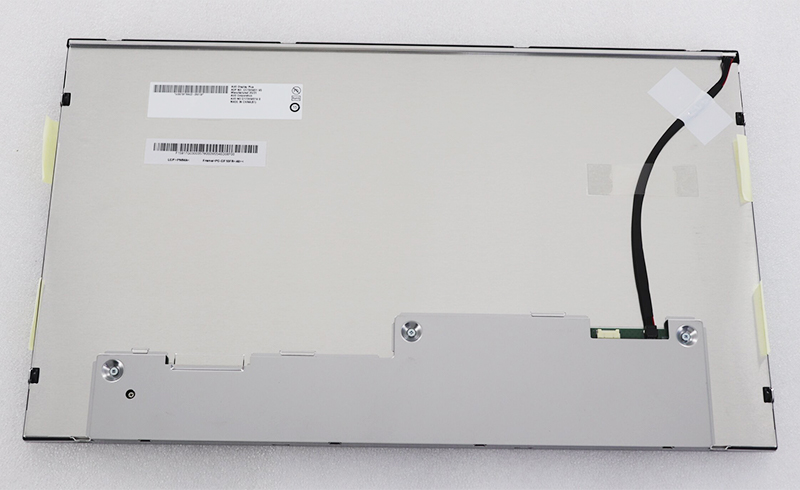
G173HW01 V.0 17.3inch 1920*1080 TFT LCD Panel for AUO G173HW01 V0
In the intricate ecosystem of electronic repair, industrial design, and custom display solutions, identifying and sourcing the correct replacement components is a critical, often daunting task. At the heart of many high-performance systems lies a component that dictates visual fidelity and user interaction: the LCD panel. This article delves deep into the specifics of one such crucial component—the G173HW01 V.0 17.3-inch 1920x1080 TFT LCD panel, designed as a replacement for the AUO G173HW01 V0 model.
Our exploration goes beyond a simple specification sheet. We will dissect the panel's core technological features, its ideal application environments, and the critical nuances of compatibility that professionals must understand. Whether you are a technician sourcing a reliable replacement, an engineer integrating displays into a larger system, or a procurement specialist ensuring part authenticity, this comprehensive guide aims to provide the actionable insights and technical depth needed to make informed decisions. Understanding this panel's role and specifications is key to ensuring optimal performance and longevity in the devices it powers.
Decoding the Model: Understanding G173HW01 V.0
The alphanumeric string "G173HW01 V.0" is a precise identifier, not a generic description. Breaking it down reveals its core meaning. "G173" typically denotes a 17.3-inch diagonal screen size. "H" often indicates a high-brightness or specific product series, while "W" confirms a Wide aspect ratio, which for a 1920x1080 resolution is 16:9. "01" is a model iteration code. The crucial "V.0" signifies the version or revision of the panel, a detail of paramount importance for compatibility.
This panel is explicitly engineered as a compatible replacement for the AUO G173HW01 V0. AUO (AU Optronics) is a leading manufacturer, and their original V0 version set a specific standard for electrical interfaces, mechanical mounting, and performance. The G173HW01 V.0 is built to match this standard exactly, ensuring it can serve as a drop-in replacement in systems originally designed for the AUO panel. Understanding this naming convention is the first step in avoiding costly mismatches and ensuring a successful repair or integration.
Technical Specifications and Performance Analysis
This 17.3-inch panel is built around a Full HD (1920 x 1080) TFT LCD matrix. The 1080p resolution on this screen size yields a sharp pixel density, suitable for detailed imaging and text. As a TFT (Thin-Film Transistor) LCD, it utilizes an active matrix design, where each pixel is controlled by one to four transistors, enabling faster response times and better image stability compared to older passive matrix technology.
Key performance parameters include its brightness (typically measured in nits), contrast ratio, and color gamut. These factors determine readability in various lighting conditions and color accuracy. The interface is almost certainly LVDS (Low-Voltage Differential Signaling), the standard for panels of this era and size, requiring a compatible controller board. A thorough analysis of its spec sheet reveals its suitability for applications demanding reliable, clear, and consistent visual output without the need for ultra-high refresh rates or HDR support.
Primary Applications and Use Cases
The G173HW01 V.0 is not a consumer-grade monitor panel but is engineered for embedded and professional applications. Its most common use is as a direct replacement in repair scenarios for laptops, all-in-one PCs, or specialized industrial equipment that originally housed the AUO V0 panel. Technicians in repair centers rely on such compatible panels to restore devices to full functionality.
Beyond repair, this panel finds purpose in industrial control systems, medical monitoring devices, and point-of-sale terminals. In these environments, consistent performance, longevity, and standard interfaces are more critical than cutting-edge gaming features. Its 17.3-inch size offers a substantial viewing area for data dashboards, control interfaces, or diagnostic displays, making it a versatile component in B2B and industrial hardware design.
Compatibility and Integration Essentials
True compatibility extends far beyond physical size and resolution. Successful integration of the G173HW01 V.0 hinges on several precise matches. Electrical interface compatibility is non-negotiable; the pin configuration, voltage requirements, and LVDS signal format must match the host system's LCD cable and controller.
Mechanical compatibility involves the exact placement of mounting holes, connector position, and overall panel thickness. Even a millimeter's discrepancy can prevent installation. Furthermore, the backlight type (typically CCFL or LED) and its connector must align. Verifying these details against the original panel's specifications or the device's service manual is an essential step to avoid integration failures and potential damage.
Sourcing Authentic Panels and Avoiding Pitfalls
The aftermarket for LCD panels is vast, with significant variance in quality. Sourcing an authentic, high-grade G173HW01 V.0 requires diligence. Key red flags include prices that seem too good to be true, vague model descriptions, and sellers with no technical support or warranty. Grade A panels guarantee no dead pixels and full performance, while lower-grade panels may have visual imperfections or reduced longevity.
Reputable suppliers will provide clear photos of the actual panel, including the label showing the exact model and version number. They should also offer compatibility guarantees or return policies for mismatched parts. Investing in a panel from a trusted source, even at a higher initial cost, prevents the greater expense of rework, customer dissatisfaction, or system failure down the line.
Installation Guidelines and Best Practices
Proper installation is critical to protect the delicate LCD panel and ensure reliable operation. Always disconnect all power sources before beginning work. Handle the panel only by its edges, avoiding any pressure on the screen surface. The connection points, especially the LVDS connector and backlight cable, are fragile; they should be seated firmly but without excessive force.
Use the correct tools, typically small Phillips-head screwdrivers and plastic pry tools, to avoid damaging bezels or the panel itself. Before final assembly, perform a pre-test by temporarily connecting the panel to power and the signal source to verify functionality. This step confirms compatibility and saves time by identifying issues before the device is fully reassembled. Anti-static precautions are also recommended to protect the panel's internal electronics.

FAQS
Q1: Is the G173HW01 V.0 exactly the same as the AUO G173HW01 V0?
A: It is designed as a compatible replacement, matching the electrical, mechanical, and optical specifications of the original AUO panel.
Q2: What does "V.0" mean in the model number?
A: It indicates the version or revision of the panel, which is crucial for ensuring compatibility with the original V0 version.
Q3: What is the screen resolution of this panel?
A: It features a Full HD resolution of 1920 pixels horizontally by 1080 pixels vertically (1920x1080).
Q4: What type of interface does this LCD panel use?
A: It almost certainly uses an LVDS (Low-Voltage Differential Signaling) interface, common for panels of this size and era.
Q5: Can I use this panel to upgrade an older laptop with a lower-resolution screen?
A: Not directly. Compatibility depends on the laptop's motherboard LCD controller, cable, and physical chassis design supporting this specific panel.
Q6: Is the backlight LED or CCFL?
A: You must check the specific panel's datasheet or listing. Replacement panels for this model are commonly available with LED backlights for better efficiency and longevity.
Q7: How do I ensure I'm buying a genuine, high-quality panel?
A: Source from reputable suppliers who provide clear photos of the label, offer Grade A quality guarantees, and have positive technical reviews.
Q8: What are the most common applications for this panel?
A: It's used in laptop repairs, all-in-one PCs, industrial control systems, medical devices, and point-of-sale terminals.
Q9: What should I check before installing this replacement panel?
A: Verify interface connector type, pin configuration, mounting hole positions, thickness, and backlight connector against your original panel.
Q10: Are there any special handling precautions for installation?
A> Yes. Always handle by the edges, disconnect all power, use proper tools, avoid static discharge, and perform a pre-test before final assembly.
Conclusion
The G173HW01 V.0 17.3-inch LCD panel represents a critical link in maintaining and operating a wide array of professional and industrial visual systems. Our deep dive has moved from decoding its model number to analyzing its technical core, applicable uses, and the meticulous details of compatibility and integration.
Success with this component hinges on a professional understanding that transcends basic specs. It requires recognizing the importance of version codes, verifying mechanical and electrical footprints, and sourcing from credible channels. For technicians, engineers, and procurement specialists, this knowledge transforms a simple part number into a blueprint for reliable performance. In the world of display technology, such precision is not just beneficial—it is essential for ensuring longevity, functionality, and user satisfaction in the devices we depend on.