- Industrie-LCD-Display
-
Industrial Products
- DC Servo Drive
- AC Servo Drive
- other
- Heidelberg
- FANUC
- IFM
- Meter
- CCD
- Membrane Keypad
- Film
- YOKOGAWA
- Card
- ABB
- MITSUBISHI
- FANUC
- KEYENCE
- BECKHOFF
- Honeywell
- HOLLYSYS
- FUJI servo drives
- HP
- solenoid valve
- thermostat
- Siemens adapter
- color oscilloscope
- Fujitsu connector
- CHELIC
- SMC
- CISCO
- INTEL
- Key board
- FAIRCHILD
- Der Aufsichtsrat
- Board
- Bearing
- other
- Control Panel
- Contactor
- Circuit
- Omron
- Relais.
- Der controller
- Optoelektronische schalter
- Optoelektronische sensoren
- Original
- Fan
- Motortreiber
- Endschalter
- Verstärker
- power supply
- LENZE
- Cable
- Encoder
- Sensor
- Transformator
- Fiber Optic Sensor
- Schutzrelais
- Temperaturregler
- Näherungsschalter
- Switch Sensor
- Siemens
- PCB
- HMI Touch-Glas
-
HMI-Vollautomat Ganze Einheit
- OMRON HMI Touch Panel
- Siemens HMI Touch Panel
- Mitsubishi HMI Touch Panel
- Allen-Bradley Automatisierung HMI Touch
- DELTA HMI Touch Panel
- EVIEW DELTA HMI Touch Panel
- KINCO DELTA HMI Touch Panel
- HITECH HMI Touch Panel
- WEINTECK HMI Touch Panel
- TECVIEW HMI Touch Panel
- WEINVIEW HMI Touch Panel
- PRO-FACE HMI Touch Panel
- SIMATIC HMI Touch Panel
- AMPIRE HMI Touch Panel
- HEIDELBERG HMI Touch Panel
- PANASONIC HMI Touch Panel
- PATLITE HMI Touch Panel
- KYOCERA HMI Touch Panel
- KEYENCE HMI Touch Panel
- WEINVIEW HMI Touch Panel
- HITECH HMI Touch Panel
- FUJI HMI Touch Panel
- HAKKO HMI Touch Panel
- SCHNEIDER HMI Touch Panel
- SAMKOON touch panel
- andere
- Module
- LCD Wechselrichter
- Membran Tastenfeld Schalter
- Winni Touch Screens
- Frequenzumrichter
- Servo Motor
- PLC




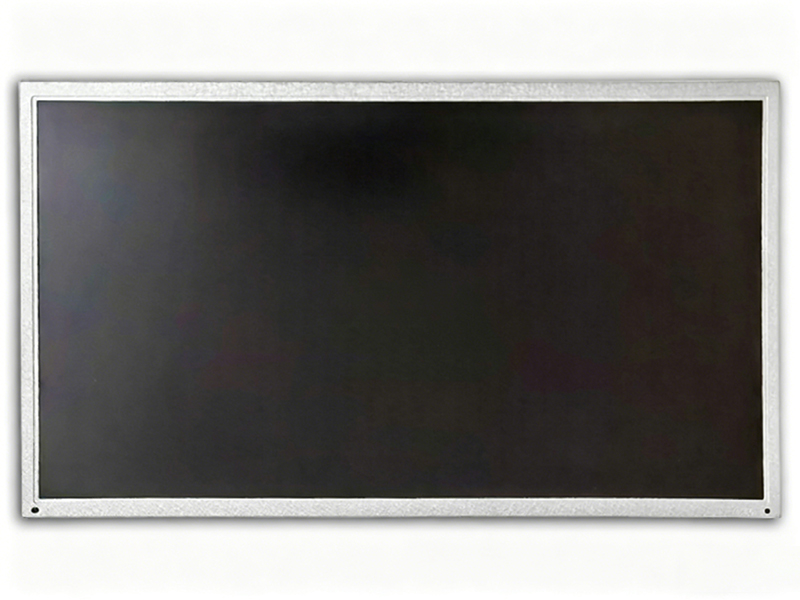
G156XW01 V101 AUO 15.6" TFT-LCD screen 1366*768 Display
In the intricate ecosystem of modern electronics, the display panel serves as the critical interface between user and machine. While flagship smartphones and high-refresh gaming monitors often dominate the spotlight, the true workhorses of the digital world are the reliable, mass-produced panels found in countless everyday devices. This article delves deep into one such component: the G156XW01 V101 TFT-LCD screen manufactured by AUO (AU Optronics).
This 15.6-inch display, with its 1366 x 768 resolution, represents a foundational technology that powered a generation of laptops, industrial equipment, and embedded systems. Beyond its basic specifications lies a story of engineering trade-offs, manufacturing scale, and enduring application. We will dissect its technical architecture, explore its performance characteristics in detail, and situate it within the broader evolution of display technology. Our analysis aims to provide electronics procurement specialists, repair technicians, and tech enthusiasts with a comprehensive understanding of this pivotal component, its legacy, and its place in the current market.
Technical Architecture and Core Specifications
The G156XW01 V101 is a 15.6-inch diagonal Twisted Nematic (TN) TFT-LCD panel. The "V.1" denotes the version or revision of the panel model, crucial for ensuring compatibility during replacement. Its native resolution of 1366 x 768 pixels, commonly referred to as HD or 720p, defines a standard aspect ratio of 16:9. This pixel matrix, while considered basic today, was engineered for efficiency and cost-effectiveness.
The panel employs a standard RGB stripe pixel arrangement and typically uses a CCFL (Cold Cathode Fluorescent Lamp) backlighting system, a hallmark of its production era. Key interface specifications include a 40-pin LVDS (Low-Voltage Differential Signaling) connector, a standard for transmitting video data in laptops of the time. Understanding these core architectural elements—the TN technology, the resolution, and the interface—is essential for diagnosing compatibility and performance expectations, forming the baseline for all subsequent analysis of its behavior and limitations.
Performance Analysis: Brightness, Contrast, and Color
Evaluating the G156XW01 V101 requires a realistic assessment of its performance within the context of its TN technology and era. Typical brightness ratings range from 200 to 250 nits, sufficient for indoor use but potentially challenging under bright ambient light. The contrast ratio, often around 500:1, is a defining characteristic of TN panels, leading to less depth in dark scenes compared to modern IPS or VA alternatives.
Color performance is its most significant trade-off. TN panels are known for limited color gamut coverage, often achieving only around 45-55% of the NTSC color space. This results in less vibrant and accurate color reproduction. Furthermore, the viewing angles are notoriously narrow, especially on the vertical axis, where colors can invert or shift dramatically when viewed from above or below. This performance profile clearly marks it as a panel designed for functional clarity rather than visual fidelity, prioritizing widespread affordability and adequate performance for basic computing tasks.
Typical Applications and Integration Context
The proliferation of the G156XW01 V101 was driven by its integration into millions of mid-range and budget-friendly laptops from major OEMs throughout the late 2000s and early 2010s. It was the default visual engine for a vast segment of the mobile computing market, found in models from brands like HP, Dell, Acer, and Toshiba. Beyond consumer notebooks, its reliability and cost structure made it a preferred choice for numerous embedded and industrial applications.
These include point-of-sale systems, medical monitoring devices, factory control panels, and kiosks. In these environments, the need for high color accuracy or wide viewing angles is often secondary to durability, long-term availability, and predictable performance. The panel's standard 40-pin LVDS interface and common form factor allowed it to become a quasi-standard, simplifying inventory for system integrators and repair depots serving a wide array of equipment.
Common Failure Modes and Repair Considerations
For technicians and DIY repairers, recognizing the common failure points of this panel is vital. The CCFL backlight system is a primary culprit. CCFL tubes dim over time and can fail entirely, leading to a very dim image or visible backlight flicker. The inverter board that powers the CCFLs is another frequent failure component. Symptoms include no backlight at all, though a faint image may be visible with a flashlight.
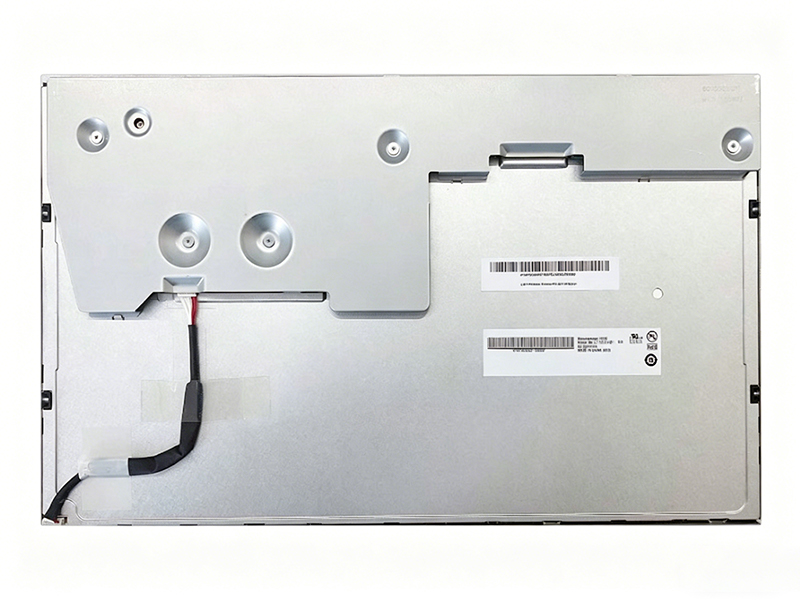
Physical damage, such as cracks in the LCD matrix or pressure marks, is irreversible and necessitates panel replacement. When sourcing a replacement, the exact model number and version (V.1) are critical. Even minor differences in revision can lead to compatibility issues with the laptop's lid closure sensor (EDID data) or mounting bracket alignment. Verifying the interface pinout and backlight type (CCFL vs. LED) is an absolute prerequisite for a successful repair.
The Market Evolution: From Dominance to Legacy Status
The G156XW01 V101's era has passed. The display industry has undergone radical shifts, rendering this specification largely obsolete for new consumer devices. The move to LED backlighting brought thinner panels, lower power consumption, and longer lifespan. More profoundly, the mass adoption of IPS (In-Plane Switching) technology dramatically improved color reproduction and viewing angles, even at entry-level price points.
Resolution standards have also escalated, with Full HD (1920x1080) becoming the minimum expectation for most laptops. Consequently, the G156XW01 now occupies a legacy and replacement niche. Its primary market is the after-servicing of existing equipment where maintaining original specifications is required for compatibility or cost reasons, rather than being specified in new designs.
Sourcing and Verification in the Modern Supply Chain
Today, sourcing a genuine G156XW01 V101 panel requires diligence. The market is populated with refurbished pulls from old equipment, compatible "aftermarket" panels, and unfortunately, counterfeit or mislabeled units. Key steps for verification include physically inspecting the label on the rear of the panel, which should match the model and version exactly. Purchasing from reputable suppliers specializing in legacy display components is highly recommended.
It is also crucial to confirm whether the unit includes a complete assembly (LCD matrix + backlight + inverters if CCFL) or just the bare LCD panel. For integrators, testing the panel for dead pixels, backlight uniformity, and color consistency before final installation is a necessary quality control step. Understanding this sourcing landscape is key to obtaining a reliable component that will perform as expected in its intended legacy role.
FAQs: G156XW01 V.1 Display Panel
1. What is the resolution of the G156XW01 V.1?
It has a native resolution of 1366 x 768 pixels (HD/720p).
2. What type of backlight does it use?
It typically uses a CCFL (Cold Cathode Fluorescent Lamp) backlight system.
3. What is the screen size?
The diagonal screen size is 15.6 inches.
4. What connector does it use?
It uses a standard 40-pin LVDS (Low-Voltage Differential Signaling) connector.
5. Is it an IPS panel?
No, it is a Twisted Nematic (TN) panel, known for faster response times but poorer viewing angles and color compared to IPS.
6. What are common devices that used this screen?
It was common in mid-range laptops from 2008-2013 from brands like HP, Dell, and Acer, and in industrial/embedded systems.
7. What does "V.1" mean in the model number?
It indicates the version or revision. Matching the exact version is crucial for compatibility during replacement.
8. Can I replace it with an LED-backlit panel?
Possibly, but it requires a compatible LED panel with the same interface, physical dimensions, and pinout. An inverter board modification may be needed.
9. What are signs this panel is failing?
Dim or flickering backlight (CCFL/inverter issue), horizontal/vertical lines, permanent discoloration, or a completely black screen with no image.
10. Where can I buy a replacement today?
From specialized electronics parts distributors, reputable online marketplaces focusing on LCD panels, or suppliers of refurbished legacy components.
Conclusion
The AUO G156XW01 V101 is far more than a set of specifications on a datasheet. It is a technological artifact that defined the visual experience for a massive cohort of users and machines. Our deep dive reveals a component masterfully engineered for its time—optimized for cost, manufacturability, and adequate performance within the constraints of TN technology. Its legacy is cemented in the millions of laptops and specialized devices it enabled.
Today, its relevance has shifted from cutting-edge integration to essential maintenance. For procurement specialists and technicians, understanding its technical nuances, common failures, and the modern sourcing landscape is invaluable for sustaining the vast installed base of equipment that still relies on it. The story of the G156XW01 V101 is a testament to the enduring lifecycle of well-designed electronic components and the critical importance of precise, knowledgeable support in the legacy technology sector.