- Industrie-LCD-Display
-
Industrial Products
- DC Servo Drive
- AC Servo Drive
- other
- Heidelberg
- FANUC
- IFM
- Meter
- CCD
- Membrane Keypad
- Film
- YOKOGAWA
- Card
- ABB
- MITSUBISHI
- FANUC
- KEYENCE
- BECKHOFF
- Honeywell
- HOLLYSYS
- FUJI servo drives
- HP
- solenoid valve
- thermostat
- Siemens adapter
- color oscilloscope
- Fujitsu connector
- CHELIC
- SMC
- CISCO
- INTEL
- Key board
- FAIRCHILD
- Der Aufsichtsrat
- Board
- Bearing
- other
- Control Panel
- Contactor
- Circuit
- Omron
- Relais.
- Der controller
- Optoelektronische schalter
- Optoelektronische sensoren
- Original
- Fan
- Motortreiber
- Endschalter
- Verstärker
- power supply
- LENZE
- Cable
- Encoder
- Sensor
- Transformator
- Fiber Optic Sensor
- Schutzrelais
- Temperaturregler
- Näherungsschalter
- Switch Sensor
- Siemens
- PCB
- HMI Touch-Glas
-
HMI-Vollautomat Ganze Einheit
- OMRON HMI Touch Panel
- Siemens HMI Touch Panel
- Mitsubishi HMI Touch Panel
- Allen-Bradley Automatisierung HMI Touch
- DELTA HMI Touch Panel
- EVIEW DELTA HMI Touch Panel
- KINCO DELTA HMI Touch Panel
- HITECH HMI Touch Panel
- WEINTECK HMI Touch Panel
- TECVIEW HMI Touch Panel
- WEINVIEW HMI Touch Panel
- PRO-FACE HMI Touch Panel
- SIMATIC HMI Touch Panel
- AMPIRE HMI Touch Panel
- HEIDELBERG HMI Touch Panel
- PANASONIC HMI Touch Panel
- PATLITE HMI Touch Panel
- KYOCERA HMI Touch Panel
- KEYENCE HMI Touch Panel
- WEINVIEW HMI Touch Panel
- HITECH HMI Touch Panel
- FUJI HMI Touch Panel
- HAKKO HMI Touch Panel
- SCHNEIDER HMI Touch Panel
- SAMKOON touch panel
- andere
- Module
- LCD Wechselrichter
- Membran Tastenfeld Schalter
- Winni Touch Screens
- Frequenzumrichter
- Servo Motor
- PLC



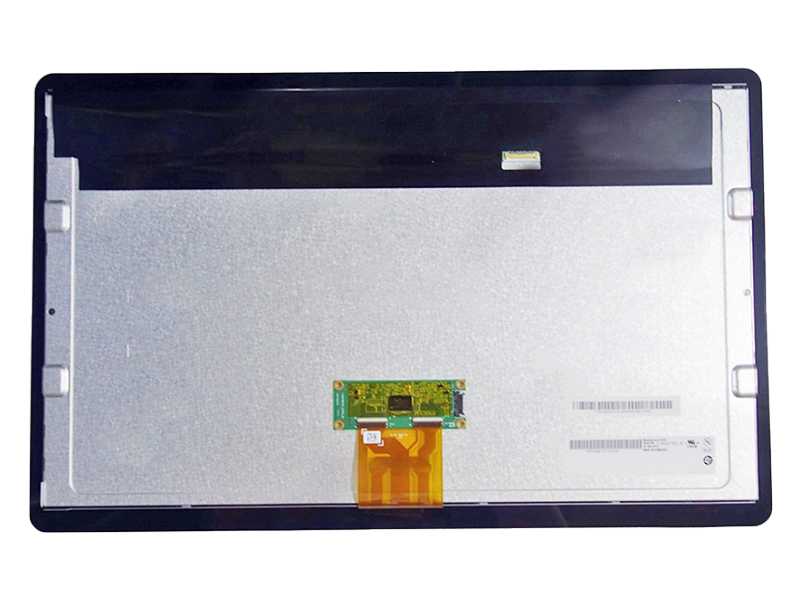
In the intricate world of display technology and device repair, a single component model number can unlock a world of possibilities. The G185XTT01.0, an 18.5-inch LCD panel developed by AU Optronics (AUO), stands as a testament to this principle. While its core specifications—a 1366 x 768 resolution and an 18.5-inch diagonal—might seem standard at first glance, this panel represents a critical piece in the ecosystem of commercial displays, all-in-one PCs, and industrial equipment.
This article delves beyond the basic datasheet to explore the G185XTT01.0 in depth. We will dissect its technical DNA, understand its ideal applications, and navigate the practical considerations of sourcing and integration. For IT managers, repair technicians, and procurement specialists, understanding the nuances of this specific panel is not just about a replacement part; it's about ensuring compatibility, optimizing performance, and making cost-effective decisions that extend the lifespan of valuable hardware.
Decoding the G185XTT01.0: Technical Specifications and Legacy
The model number G185XTT01.0 itself is a code. The "G" often denotes a panel group, "185" confirms the 18.5-inch size, and the subsequent letters and numbers specify the revision, backlight type, and interface details. Its 1366 x 768 resolution, known as HD or WXGA, was once the dominant standard for entry-level and mid-range displays, offering a balance between clarity and manufacturing cost. The panel typically employs a Twisted Nematic (TN) film technology, which provides fast response times and high brightness, making it suitable for dynamic content and well-lit environments.
AUO, as the manufacturer, is a leading global producer of TFT-LCD panels, known for consistent quality and reliability. This particular model often features an LVDS (Low-Voltage Differential Signaling) interface, a common standard for internal display connections in computers and embedded systems. Understanding these foundational specs is crucial, as they directly dictate where and how the panel can be used, forming the basis for all compatibility assessments.
Primary Applications and Ecosystem Integration
The G185XTT01.0 was not designed for the consumer monitor market in isolation. Its true home is within integrated systems. You will most commonly find this panel serving as the display component in all-in-one (AIO) desktop computers from major OEMs, point-of-sale (POS) systems in retail and hospitality, kiosks for information or self-service, and various industrial control panels.
In these applications, the display is not a standalone peripheral but a tightly integrated part of a larger machine. The physical dimensions, bezel design, mounting hole positions, and connector placement are as critical as the electrical specifications. This panel is engineered to drop into specific chassis, connecting seamlessly to a system's motherboard or controller board. Its reliability and longevity are paramount, as failure in a commercial setting can mean downtime and lost revenue.
The Critical Role of Compatibility and Cross-Reference
When sourcing a replacement G185XTT01.0, compatibility is the absolute paramount concern. It is not interchangeable with every other 18.5-inch panel. Key parameters must match exactly: the physical size and mounting pattern, the interface type and pin definition (e.g., 30-pin LVDS, single-channel), the backlight type (usually LED), and the voltage requirements.
Professionals rely heavily on cross-reference databases. The G185XTT01.0 will have a list of compatible panel numbers from other manufacturers (like LG, Samsung, or Innolux) and, more importantly, a list of OEM device models it fits. For instance, it might be the designated screen for certain generations of Dell, HP, or Lenovo AIO PCs. Verifying against the original panel's label and the host device's service manual is a non-negotiable step to avoid costly mistakes.

Sourcing and Supply Chain Considerations
The market for panels like the G185XTT01.0 exists in a unique space between new old stock (NOS), refurbished pulls, and compatible alternatives. As AUO may have phased out direct production, supply comes from specialized distributors who inventory panels for the repair industry. Condition is a key differentiator: Grade A refurbished panels should be flawless, while lower grades may have minor imperfections.
Procurement decisions must weigh factors like warranty, authenticity (beware of misleading labels), price, and lead time. Establishing a relationship with a reputable supplier who provides accurate compatibility information and technical support is invaluable. For high-volume needs, such as maintaining a fleet of kiosks, this becomes a strategic supply chain decision impacting operational continuity.
Installation Nuances and Practical Repair Insights
Successful installation extends beyond plugging in a connector. The process requires ESD (electrostatic discharge) precautions to prevent damaging the delicate electronics. Technicians must carefully handle the panel, avoiding pressure on the screen itself. The sequence often involves removing the original bezel, disconnecting the old panel from its LVDS cable and inverter/power board (if separate), and then reversing the process with the new unit.
Common pitfalls include damaging the fragile LVDS connector, pinching cables, or failing to secure the panel properly, leading to pressure marks or light leakage. A successful repair not only restores functionality but also ensures the display's longevity and visual integrity, preserving the user experience of the original equipment.
Future-Proofing and the Landscape of Display Technology
While the G185XTT01.0 remains relevant for maintaining existing hardware, it represents a technological generation that is being superseded. The industry has largely moved toward Full HD (1920x1080) and higher resolutions, with IPS panel technology offering superior viewing angles and color reproduction.
For businesses, this presents a strategic question: continue investing in legacy panel repairs or plan for a phased upgrade of hardware? The decision hinges on the total cost of ownership, the criticality of the equipment, and the user experience requirements. Understanding the role and specifications of the G185XTT01.0 provides the data needed to make that informed choice, balancing practicality with forward-looking planning.
FAQs: G185XTT01.0 LCD Panel
1. What devices use the G185XTT01.0 screen?
It is commonly found in specific models of all-in-one PCs, point-of-sale systems, information kiosks, and industrial monitors from brands like Dell, HP, and Fujitsu.
2. Is the G185XTT01.0 an IPS or TN panel?
It is almost certainly a TN (Twisted Nematic) panel, known for fast response and good brightness but narrower viewing angles compared to IPS.
3. What is the screen resolution?
The native resolution is 1366 pixels horizontally by 768 pixels vertically (WXGA/HD).
4. What type of interface does it use?
It typically uses a 30-pin LVDS (Low-Voltage Differential Signaling) interface.
5. Can I replace it with any 18.5-inch screen?
No. Physical dimensions, mounting holes, connector type/pinout, and backlight voltage must match exactly for compatibility.
6. How do I find a compatible replacement?
Use the exact model number from the original panel's label and consult with a specialist distributor's cross-reference list.
7. Are "compatible" or "equivalent" panels safe to use?
Yes, if they are verified as a direct cross-reference from a reputable source. They are often panels from other makers (LG, Innolux) with identical specifications.
8. What does the backlight type mean?
The G185XTT01.0 uses an LED backlight, which is energy-efficient and long-lasting. The backlight is integrated into the panel assembly.
9. Why is my replacement panel not working?
Common causes are an incompatible pinout, a damaged LVDS cable during installation, or a mismatch in backlight power requirements.
10. Should I repair with this panel or upgrade the whole device?
This depends on the age and value of the host device, the cost of the panel/repair, and whether the 1366x768 resolution meets your ongoing needs.
Conclusion
The AUO G185XTT01.0 LCD panel is far more than a simple collection of glass and electronics. It is a specialized component engineered for integration, playing a vital role in sustaining the operational life of countless commercial and industrial systems. A deep understanding of its specifications, compatibility landscape, and application context is essential for anyone involved in technical procurement, repair, or asset management.
Navigating its world successfully requires a meticulous approach—prioritizing exact compatibility, sourcing from reliable partners, and executing careful installation. While display technology continues to advance, the need to maintain existing infrastructure ensures that components like the G185XTT01.0 will remain relevant. Ultimately, mastering the details of such specific parts empowers professionals to make smarter, more economical decisions, ensuring reliability and maximizing return on investment for the hardware they support.